---
title: Table Component
description: Display and interact with data in tabular format
---
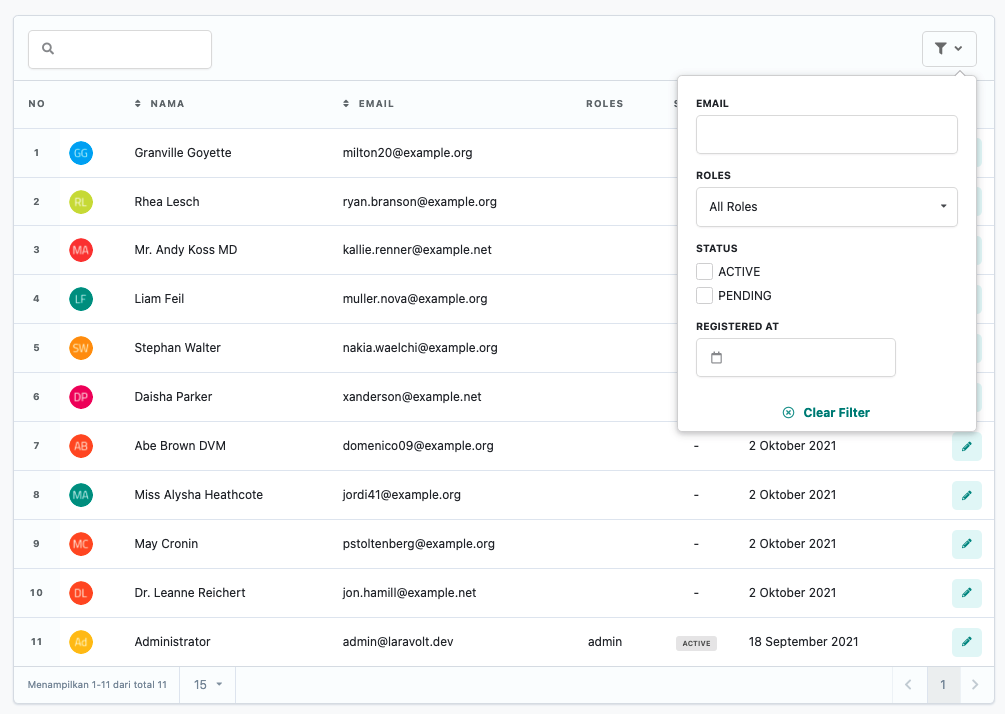
Laravolt provides a powerful Table component for displaying data in a tabular format with features like searching, sorting, and filtering - all without writing JavaScript.
---
## Introduction
Laravolt Table provides a UI for displaying data in tabular form with supporting features like searching, sorting, and filtering. Built on [Livewire](https://laravel-livewire.com/), tables can be interacted with without full page refreshes. You don't need to worry about JavaScript because all UI-related aspects are already handled by Laravolt - just focus on writing PHP code.
## Creating Tables
Because tables are built on Livewire, all Table classes are stored in the `app\Http\Livewire\Table` folder. To create a new Table, run the `make:table` command:
```bash
php artisan make:table UserTable
```
Then, define your data source and the columns to display:
```php
use Laravolt\Suitable\Columns\Text;
class UserTable extends TableView
{
public function data()
{
return \App\Models\User::where('status', 'ACTIVE')->paginate();
}
public function columns(): array
{
return [
Text::make('name', 'Name'),
Text::make('email', 'Email'),
];
}
}
```
## Displaying Tables
To display a table, simply call the Blade component or directive from your view:
```php
// or
@livewire('table.user-table')
// or
@livewire(\App\Http\Livewire\Table\UserTable::class)
```
### Reference
- [Livewire Documentation on Rendering Components](https://laravel-livewire.com/docs/2.x/rendering-components)
## Data Sources
Laravolt Table can process several types of data sources to display in a table. The available options for the `data()` method return value are:
- Array
- Collection
- Eloquent
- Query Builder
- Response from HTTP Client
### Array
The simplest data source is an `array`:
```php
public function data()
{
return [
['name' => 'Andi', 'email' => 'andi@example.com'],
['name' => 'Budi', 'email' => 'budi@example.com'],
];
}
```
### Collection
You can also use `\Illuminate\Support\Collection` as a data source:
```php
public function data()
{
$users = [
['name' => 'Andi', 'email' => 'andi@example.com'],
['name' => 'Budi', 'email' => 'budi@example.com'],
['name' => 'Citra', 'email' => null],
];
return collect($users)->reject(fn($user) => $user->email === null);
}
```
### Eloquent
The most commonly used data source is Eloquent:
```php
use App\Models\User;
public function data()
{
return User::whereNull('deleted_at')->paginate();
}
```
If you don't need pagination, you can directly call `get()`:
```php
use App\Models\User;
public function data()
{
return User::query()->whereNull('deleted_at')->get();
}
```
### Query Builder
If Eloquent isn't your preference and you prefer Query Builder, you can still apply the same approach:
```php
public function data()
{
return \DB::table('users')->whereNull('email')->paginate();
}
```
Or without pagination:
```php
public function data()
{
return \DB::table('users')->get();
}
```
### Response From HTTP Client
To retrieve data directly from an API, you can use Laravel's built-in [HTTP Client](https://laravel.com/docs/master/http-client):
```php
use Illuminate\Support\Facades\Http;
public function data()
{
return Http::get('https://jsonplaceholder.typicode.com/users');
}
```
## Column Types
Laravolt Table provides various column types to display different kinds of data appropriately:
### Avatar
The `Avatar` column automatically displays avatar images generated from initials. In the example below, the email initials will be used to generate an appropriate avatar image:
```php
use Laravolt\Suitable\Columns\Avatar;
public function columns(): array
{
return [
Avatar::make('email', 'Avatar'),
];
}
```
Complete documentation about `Avatar` can be found at [https://github.com/laravolt/avatar](https://github.com/laravolt/avatar).
### Boolean
The `Boolean` column displays **_true_** or **_false_** values as icons. Non-boolean values will be automatically cast to `(bool)`:
```php
use Laravolt\Suitable\Columns\Boolean;
public function columns(): array
{
return [
Boolean::make('is_active'),
];
}
```
### Button
The `Button` column adds buttons that function as navigation to other pages:
```php
use Laravolt\Suitable\Columns\Button;
public function columns(): array
{
return [
Button::make('permalink', 'Info')->label('Profile')->icon('external link'),
];
}
```
In the example above, `permalink` contains a valid URL, either a hardcoded "http://example.com" or the result of calling Laravel's `route()` or `url()` function:
```php
class User extends Model
{
public function getPermalinkAttribute()
{
return route('users.show', $this->id);
}
}
```
`Button::make()` also accepts a `Closure` to dynamically generate URLs:
```php
use Laravolt\Suitable\Columns\Button;
public function columns(): array
{
return [
// using arrow function syntax
Button::make(fn ($user) => route('users.show', $user['id'])),
// or the longer traditional way
Button::make(
function ($user) {
return route('users.show', $user['id']);
}
),
];
}
```
### Checkall
The `Checkall` column adds a **checkbox** to each row that can be used for multiple selection. Selected IDs can then be sent as parameters when defining `Table Action`:
```php
use Laravolt\Suitable\Columns\Checkall;
public function columns(): array
{
return [
Checkall::make('id'),
];
}
```
### Date
The `Date` column converts database dates with format `2021-06-02` to a more human-readable format, like **June 2, 2021**:
```php
use Laravolt\Suitable\Columns\Date;
public function columns(): array
{
return [
Date::make('created_at'),
];
}
```
Additional methods available for the `Date` column type:
- `format(string $format)` where $format is a string that follows the format accepted by [Moment.js](https://momentjs.com/).
- `timezone(string $timezone)` for automatic date conversion to the appropriate timezone. Valid timezones can be found in the [official PHP documentation](https://www.php.net/manual/en/timezones.php). If `timezone()` is not explicitly called, the conversion will consider:
- The `timezone` attribute of the currently logged-in user: `auth()->user()->timezone`.
- If null, the timezone will be taken from `config('app.timezone')`.
### DateTime
Similar to the `Date` column, `DateTime` changes values like **2021-06-02 22:54:00** to **June 2, 2021 at 22:45**:
```php
use Laravolt\Suitable\Columns\DateTime;
public function columns(): array
{
return [
DateTime::make('created_at'),
];
}
```
The `format()` and `timezone()` methods are also available, with the same behavior as the `Date` column.
### Html
The `Html` column is used when the content to be displayed contains HTML tags, and you want to display it according to HTML format:
```php
public function data()
{
return [
['bio' => 'Strong foo'],
];
}
public function columns(): array
{
return [
Html::make('bio')
];
}
```
In the example above, the table will display the content as "**Strong** _foo_". This column is commonly used when the stored data comes from a **WYSIWYG** or **_rich text editor_** like Redactor or TinyMCE.
### Id
The `Id` column is used to display the primary key of an Eloquent model. Behind the scenes, this column will call `getKey()`. So make sure to only use this column when the data source comes from Eloquent:
```php
use Laravolt\Suitable\Columns\Id;
public function columns(): array
{
return [
Id::make(),
];
}
```
### Image
The `Image` column is used to display images:
```php
use Laravolt\Suitable\Columns\Image;
public function columns(): array
{
return [
Image::make('profile_picture')
];
}
```
Additional methods available:
- `height(int $sizeInPixel)` to set the image height.
- `width(int $sizeInPixel)` to set the image width.
- `alt(string $text)` to set the `alt` attribute (alternate text).
### Label
The `Label` column is used to display a value so it stands out more. Examples of values suitable to be displayed as `Label` include: status, category, type, and similar attributes:
```php
use Laravolt\Suitable\Columns\Label;
public function columns(): array
{
return [
Label::make('status'),
];
}
```
To add CSS classes to a `Label`, you can use the `addClass` method:
```php
use Laravolt\Suitable\Columns\Label;
public function columns(): array
{
return [
Label::make('status')->addClass('green small'),
];
}
```
There are several **_built-in_** classes that can be used to determine the color of a `Label`: `red`, `orange`, `yellow`, `olive`, `green`, `teal`, `blue`, `violet`, `purple`, `pink`, `brown`, `grey`, and `black`.
In practice, there's a need to give different colors to each _value_. This can be done using the `map()` method:
```php
use Laravolt\Suitable\Columns\Label;
public function columns(): array
{
return [
Label::make('status')->map([
'active' => 'green',
'banned' => 'red',
]),
];
}
```
### Number
The `Number` column is used to display a _value_ in a more human-friendly number format. For example, a value of 1000000 will automatically be changed to **1,000,000** and displayed **right-aligned**:
```php
use Laravolt\Suitable\Columns\Number;
public function columns(): array
{
return [
Number::make('salary',)
];
}
```
The number format currently used is the format commonly used in Indonesia.
### Raw
The `Raw` column is used to display a `value` **as is** (_unescaped_), without going through the `htmlspecialchars` function. Be careful when using `Raw` for a _value_ that comes from _user_ input, as there's a potential for **_Cross-Site Scripting (XSS)_**:
```php
use Laravolt\Suitable\Columns\Raw;
public function data()
{
return [
['bio' => 'Strong'],
];
}
public function columns(): array
{
return [
Raw::make('bio'),
];
}
```
In the example above, we'll get a **Strong** text (in bold) and the JavaScript code to display an _alert_ will be executed by the _browser_.
If you need more flexible _custom logic_, the `Raw` column type can also accept a _Closure_:
```php
// Display a list of roles for a user, separated by commas
Raw::make(
function ($user) {
return $user->roles->implode('name', ', ');
},
'Roles'
),
```
### RestfulButton
The `RestfulButton` column is used to create standard buttons for a _create-read-update-delete_ or **CRUD** process. You only need to define the _resource name_ to generate three buttons: **show**, **edit**, and **destroy**:
```php
use Laravolt\Suitable\Columns\RestfulButton;
public function columns(): array
{
return [
RestfulButton::make('users'),
];
}
```
In the example code above, the three buttons generated will have routes:
- show: `route('users.show', )`
- edit: `route('users.edit', )`
- destroy: `route('users.destroy', )`
`` is automatically taken from the _primary key_ of the _object_ in question. Therefore, `RestfulButton` **can only be used if the data source comes from Eloquent**.
Additional methods available:
- `only($action1, $action2)` if you only want to display certain actions, for example `only('show')`.
- `except($action1, $action2)` if you want to hide certain buttons, for example `except('destroy')`.
To learn more about _resource controllers_, please read the [official documentation from Laravel](https://laravel.com/docs/master/controllers#resource-controllers).
### RowNumber
The `RowNumber` column is used to display row numbers in sequence, starting from 1:
```php
use Laravolt\Suitable\Columns\RowNumber;
public function columns(): array
{
return [
RowNumber::make(),
];
}
```
### Text
The `Text` column is used to display values safely, protected from **_Cross-Site Scripting (XSS)_**, using PHP's built-in `htmlspecialchars` function:
```php
use Laravolt\Suitable\Columns\Text;
public function data()
{
return [
['bio' => 'Strong'],
];
}
public function columns(): array
{
return [
Text::make('bio'),
];
}
```
In the example above, "bio" will be displayed as-is according to the written text:
```text
Strong
```
### Text vs Html vs Raw
There are three columns that can be used to display content from WYSIWYG editors containing HTML tags (and JavaScript). Here's the difference between the three:
| Column | Output | Notes |
| ------ | --------------------------------------------- | ------------------------------------------------------ |
| Text | `Strong ` | Safest, displays text as-is. |
| Html | **Strong** `` | If you only want to execute HTML tags. |
| Raw | **Strong** (and alert appears in the browser) | If you want to fully execute HTML and JavaScript code. |
### Url
The `Url` column is used to automatically display a URL as a clickable _link_:
```php
use Laravolt\Suitable\Columns\Url;
public function columns(): array
{
return [
Url::make('website'),
];
}
```
### View
When the display becomes more complex, we can use the `View` column to move the _logic_ for rendering the contents of a column to a separate blade file:
```php
use Laravolt\Suitable\Columns\View;
public function columns(): array
{
return [
View::make('profile')
];
}
```
Then create a blade file `profile.blade.php`:
```html
- Name
- {{ $data->name }}
- Email
- {{ $data->email }}
```
## Custom Column
If you don't find a suitable column type, then `Raw` is the first choice to display data with your own _custom logic_.
If this _custom logic_ is needed in multiple places and you want to apply the **_Don't Repeat Yourself (DRY)_** principle, then creating a specific Class for a _custom column_ becomes a wiser choice.
Here's the framework for a _custom column_ that functions to _mask_ the displayed data:
```php
{$this->field});
}
}
```
All you need to create is a _class_ that _extends_ `Column` (base class), implements _ColumnInterface_, and defines _logic_ to display data in the _cell($cell, $collection, $loop)_ function.
**`$cell`** is an item from the Collection (can be an Eloquent model or other object) that will currently be displayed in the _cell_ of a table.
**`$collection`** is the entire data (Collection).
**`$loop`** contains information about _looping_, according to [Laravel's documentation](https://laravel.com/docs/master/blade#the-loop-variable).
In the example above, the _custom column_ is saved in `app/tables/columns`. This is not a standard rule. Please adjust the namespace according to your application structure.
## Searching
### Search Query
When users type something in the search field (searchbox), the input will automatically be _bound_ to the `$search` property, so we can access it by calling `$this->search`.
Here's an example code to search by name:
```php
class UserTable extends TableView
{
public function data()
{
return \App\Models\User::where('status', 'ACTIVE')
->whereLike(['name', 'email'], $this->search)
->paginate();
}
}
```
> `whereLike` is an additional _method_ from Laravolt to search multiple columns at once using the `where like "%%"` mechanism. For large amounts of data, this query may not be optimal. Please create your own search _logic_ as needed.
### Show/Hide Searchbox
```php
class UserTable extends TableView
{
public bool $showSearchbox = false; // default is "true"
}
```
### Search Debounce
Every time a User types something in the searchbox, the search query will automatically run with an AJAX mechanism. Debounce is a mechanism to **wait a few moments** until the User is considered to have really stopped typing, then the query is executed to update the displayed data.
```php
class UserTable extends TableView
{
public int $searchDebounce = 1000; // in milliseconds, default is 300
}
```
## Sorting
When defining a table, we can add the `sortable()` function to any defined column. Automatically, that column will be clickable.
```php
use Laravolt\Suitable\Columns\Text;
class UserTable extends TableView
{
public function data()
{
return \App\Models\User::where('status', 'ACTIVE')->paginate();
}
public function columns(): array
{
return [
Text::make('name', 'Name')->sortable(),
Text::make('email', 'Email')->sortable(),
Raw::make(
fn ($data) => DateHelper::formatDate($data->birth_date),
'Birth Date'
)->sortable('birth_date'),
];
}
}
```
But don't forget, we also need to modify the _query_ so that the resulting data is also sorted. Laravolt has provided the `AutoSort` Trait to _handle_ this need.
First, make sure the Model that is the data source is already using `AutoSort`:
```php
namespace App\Models;
use Laravolt\Suitable\AutoSort;
class User extends Model
{
use AutoSort;
}
```
Next, we just need to call the _autoSort()_ function when _querying_ the data:
```php
class UserTable extends TableView
{
public function data()
{
return \App\Models\User::where('status', 'ACTIVE')
->autoSort($this->sortPayload())
->paginate();
}
}
```
## Filtering
Filtering functions to perform more **_exact_** searches. When adding Filtering, try to ensure the table data source is still in the form of a Query Builder. This is necessary because the Filtering _logic_ will be applied after calling `data()`.
```php
class UserTable extends TableView
{
public function data()
{
// NOT OK
return \App\Models\User::get();
// NOT OK
return \App\Models\User::paginate();
// OK
return \App\Models\User::query();
// OK
return \App\Models\User::where('status', 'ACTIVE');
}
}
```
To add a Filter, create a _class_ with a skeleton like the following:
```php
where('email', $value);
}
return $data;
}
}
```
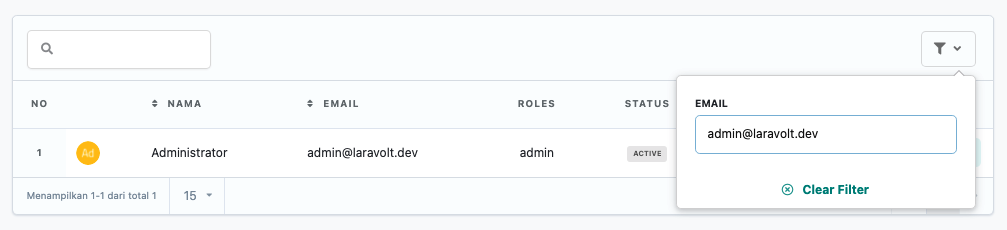
You can change the query _logic_ in the `apply` _method_ as needed. In the example above, filtering is done with an _exact match_.
Then add that _class_ to the `filters()` _method_ of the `Table`:
```php
use App\Models\User;
use App\Tables\Filters\EmailFilter;
class UserTable extends TableView
{
public function data()
{
return User::where('status', 'ACTIVE'); // don't forget to import the class on top with "use"
}
public function filters(): array
{
return [
new EmailFilter(), // don't forget to import the class on top with "use"
];
}
}
```
The result will look something like this:
### Built-in Filters
There are several types of Filters already available and ready to be _extended_, namely:
- TextFilter
- DropdownFilter
- CheckboxFilter
- DateFilter
#### Text Filter
```php
where('email', $value);
}
return $data;
}
}
```
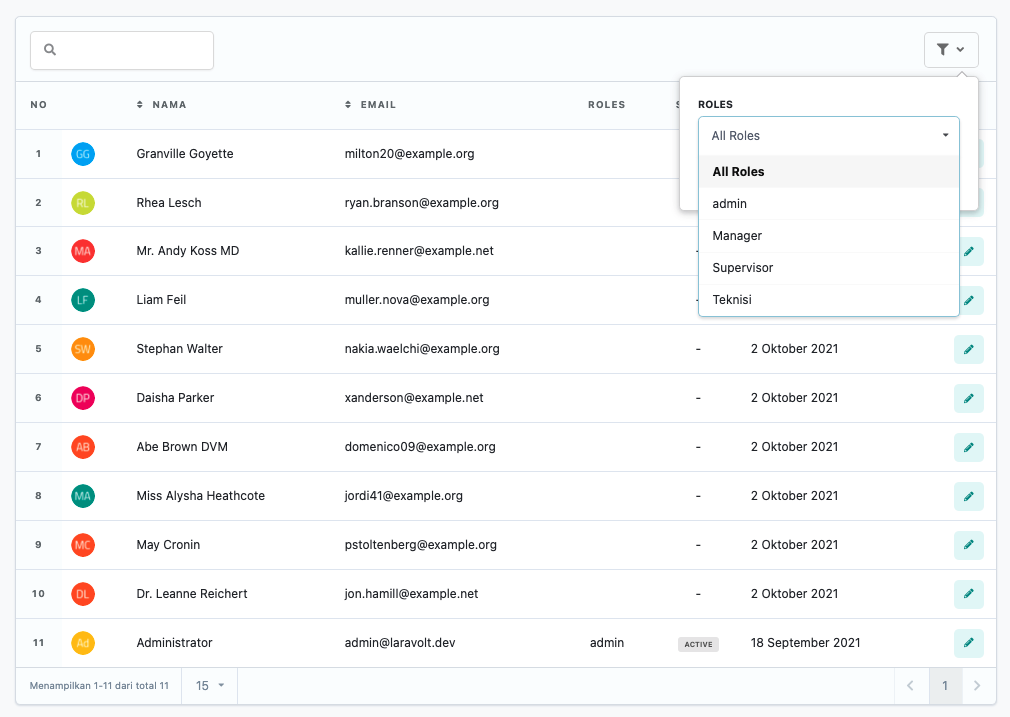
#### Dropdown Filter
```php
whereHas('roles', fn ($query) => $query->where('id', $value));
}
return $data;
}
public function options(): array
{
return Role::query()->pluck('name', 'id')->prepend('All Roles', '0')->toArray();
}
}
```
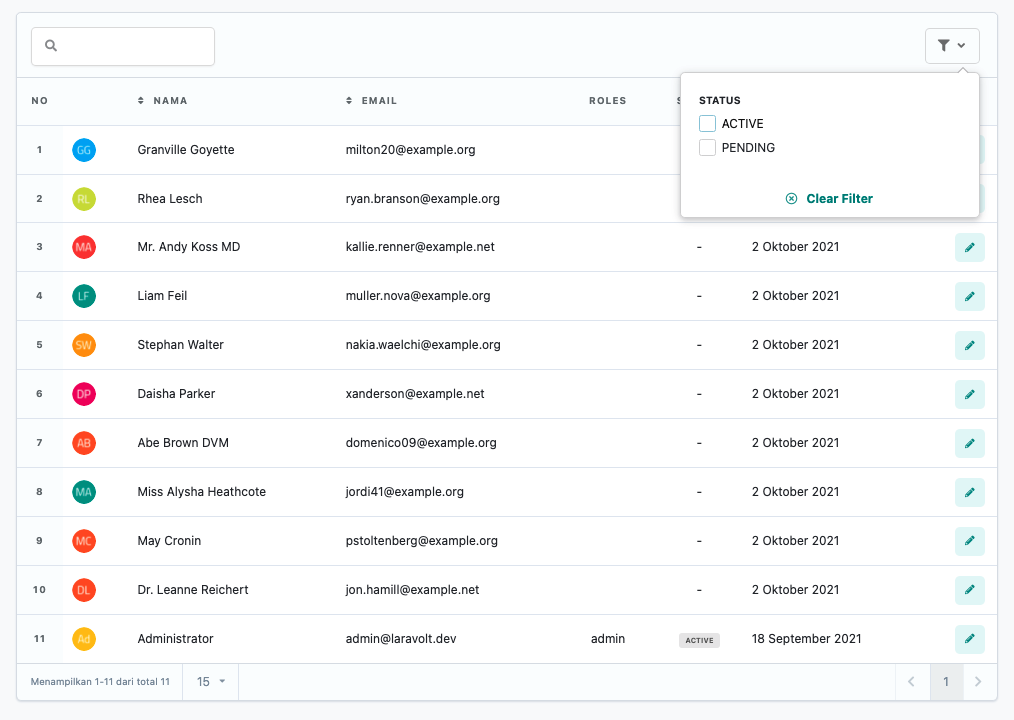
#### Checkbox Filter
```php
filter()->values()->toArray();
if (! empty($status)) {
$data->whereIn('status', $status);
}
return $data;
}
public function options(): array
{
return [
'ACTIVE' => 'ACTIVE',
'PENDING' => 'PENDING',
];
}
}
```
#### Date Filter
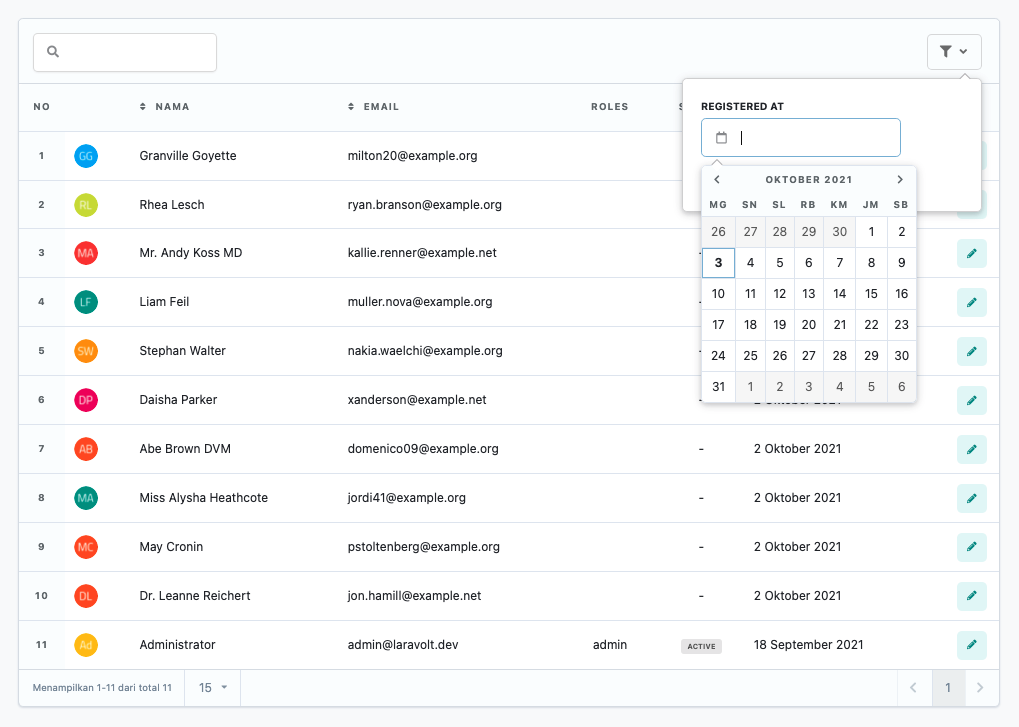
```php
where('created_at', $value);
}
return $data;
}
}
```
## Pagination
Pagination will be displayed automatically according to the data source returned in the `data()` _method_. Pagination customization can be done by changing several properties:
```php
class UserTable extends TableView
{
// change the default number of data shown per page
private const DEFAULT_PER_PAGE = 15;
// change the options for data shown per page
protected array $perPageOptions = [5, 15, 30, 50, 100, 250];
// if you want to change the view
protected $paginationView = 'laravolt::pagination.livewire.simple';
}
```
## Query String
Every time a User interacts with the Table, the current **_state_** will be saved as a _query string_. For example, after searching for data with the keyword "foo", the browser URL will automatically change to:
```http
/users?search=foo
```
The advantages of explicitly storing **_state_** in the URL include:
1. Users can easily share the current URL.
2. When Users refresh their browser, the displayed data will match the last **_state_**.
Here are the **_states_** that will automatically change the _query string_ in the _browser_:
```php
protected $queryString = [
'page' => ['except' => 1],
'search' => ['except' => ''],
'sort' => ['except' => null],
'direction',
'perPage' => ['except' => self::DEFAULT_PER_PAGE],
];
```
Please study [Livewire's official documentation](https://laravel-livewire.com/docs/2.x/query-string) regarding _query strings_.
However, if for some reason you don't want the above _behavior_ (for example when having to display 2 tables on the same page), simply empty the `$queryString` property:
```php
class UserTable extends TableView
{
protected $queryString = [];
}
```
Afterwards, whenever Users interact with the table (_searching, sorting, filtering, pagination_), the browser URL will not change.